How to Trace Email Source IP

Each email we receive must have been sent from a computer which has its IP address. An email has a portion called header which remain hidden from us, this header contains the information of the originating computer’s IP and route an email takes to its destination computer. Email headers can be thought of like envelopes for postal mail. They contain the electronic equivalent of addressing and postmarks that reflect the route of a mail from source to destination.The headers don't contain any personal information. At most, you can get the originating IP and the computer name that sent the email. The originating IP can be looked up to determine from where the email was sent.. A header most likely to determine the city and the ISP the sender used.
Email Security

How to find the email header?
Determining a header is not the same for every type of email system.
Trace Outlook
Right click the email while it's in the inbox and choose Message Options. A window will open with the headers in the bottom of the window.
Trace Windows Live Mail
Right click the email while it's in the inbox, choose Properties, then click the Details tab.
Tracing GMail
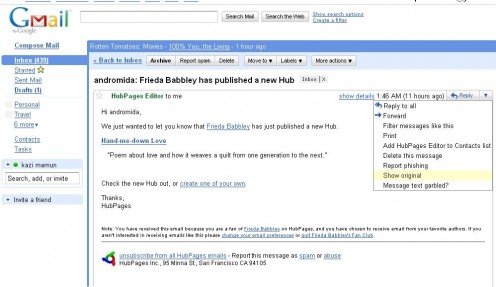
Open the email. In the upper right corner of the email you'll see the word Reply with a little down arrow to the right. Click the down arrow and choose Show Original.
Tracing Hotmail
Right click the email in the inbox and choose View Message Source.
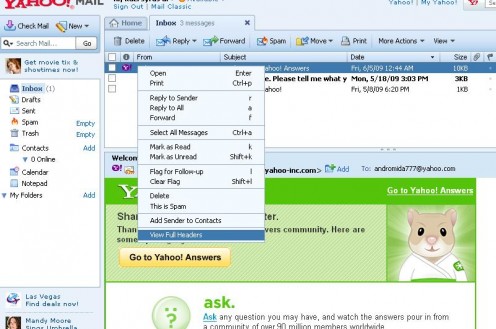
Tracing Yahoo mail
Right click the email in the inbox and choose View Full Headers.
You can see that no matter the email program, the headers are usually just a right click away.
Finally, the popular Internet-based email services differ greatly in their use of IP addresses in email headers. Use these tips to identify IP addresses in such mails.
Note: Google's Gmail service omits the sender IP address information from all headers. Instead, only the IP address of Gmail's mailserver is shown in Received: from. This means it is impossible to find a sender's true IP address in a received Gmail.
Note: Microsoft's Hotmail service provides an extended header line called "X-Originating-IP" that contains the sender's actual IP address.
Note: Emails from Yahoo (if untampered) contain the sender's IP address in the last Received: entry
What to do after getting the header?
Usually the first IP listed is where the email originated. There are exceptions to this. You'll have to look at the information logically to deduce the originating IP.
Can we trace all types of email ?
Yes and No. For example, someone who sends an email to your hotmail account shows in the X-Originating IP section of the headers. However, someone who sends you an email from GMail
Email header's Sample:
Return-path: <abcdef2222@gmail.com>
Envelope-to: andromida-2009@gmail.com
Delivery-date: Fri, 12 Dec 200802:58:23 -0600
Received: from ti-out-0910.google.com ([209.85.142.188])
by strontium.webserversystems.com with esmtp (Exim 4.69)
(envelope-from <abcdef2222@gmail.com>)
id 1LB3qp-0005cD-9e
for andromida-2009@gmail.com; Fri, 12 Dec 2008 02:58:23 -0600
Received: by ti-out-0910.google.com with SMTP id 24so1217516tim.7
for <andromida-2009@gmail.com>; Fri, 12 Dec 2008 00:58:17 -0800 (PST
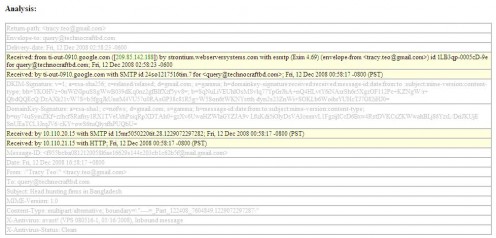
Yahoo! Email header
Gmail Header
Result of header analysis:
The source host name is "ti-out-0910.google.com" and the source IP address is 209.85.142.188.
Geo-Location Information
Country
| United States
|
|---|---|
State/Region
| CA
|
City
| Mountain View
|
Postal Code
| 94043
|
Latitude
| 37.4192
|
Longitude
| -122.0574
|
Area Code
| 650
|
For tracing the sender you can paste the header of your email in the following address:
http://www.whatismyipaddress.com/staticpages/index.php/trace-email-source-IP-address